

How Google Ads Budget Actually Works in 2026 – Everything You Need to Know Before You Spend a Single Rupee

Google Ads Budget 2026 works very differently than most beginners expect I’ve seen it happen too many times, someone sets up a Google Ads campaign, puts in a budget, and then gets completely confused when the amount deducted doesn’t match what they entered. If that’s you, you’re in the right place. In this blog, I’m breaking down exactly how Google Ads budget works the daily budget, the average daily budget, the monthly spend cap, and what Google is actually doing behind the scenes with your money.
What Is a Google Ads Budget 2026?
A Google Ads budget is the maximum amount you’re willing to spend per day to run your advertising campaign. It’s the financial guardrail you set to make sure your marketing spend stays within limits.
But here’s where most beginners go wrong they think “daily budget” means Google will spend exactly that amount every single day. That’s not how it works.
Google uses what’s called an average daily budget which means the actual daily spend can go higher or lower depending on traffic, competition, and search demand on that particular day.
Key things to understand upfront:
- Your daily budget is an average, not a hard daily cap
- Google can spend up to 2x your daily budget on a high-traffic day
- Google will never exceed your monthly spend cap (more on this below)
- Your budget is deducted directly from your linked Google Ads account
There is no official minimum daily budget for Google Ads in 2026, but practically you need at least ₹200–₹300/day (or $2–$3/day globally) to generate any meaningful traffic from your campaigns.
Where Do You Set Your Budget in Google Ads?
Setting your budget in Google Ads is straightforward. Here’s where it fits into the campaign creation flow:
- Choose your campaign goal (leads, traffic, sales, etc.)
- Select campaign type (Search, Display, Shopping, etc.)
- Set your targeting location, language, audience
- Choose your keywords
- Set your bids
- → This is where you set your Budget and Campaign Dates
- Review and launch
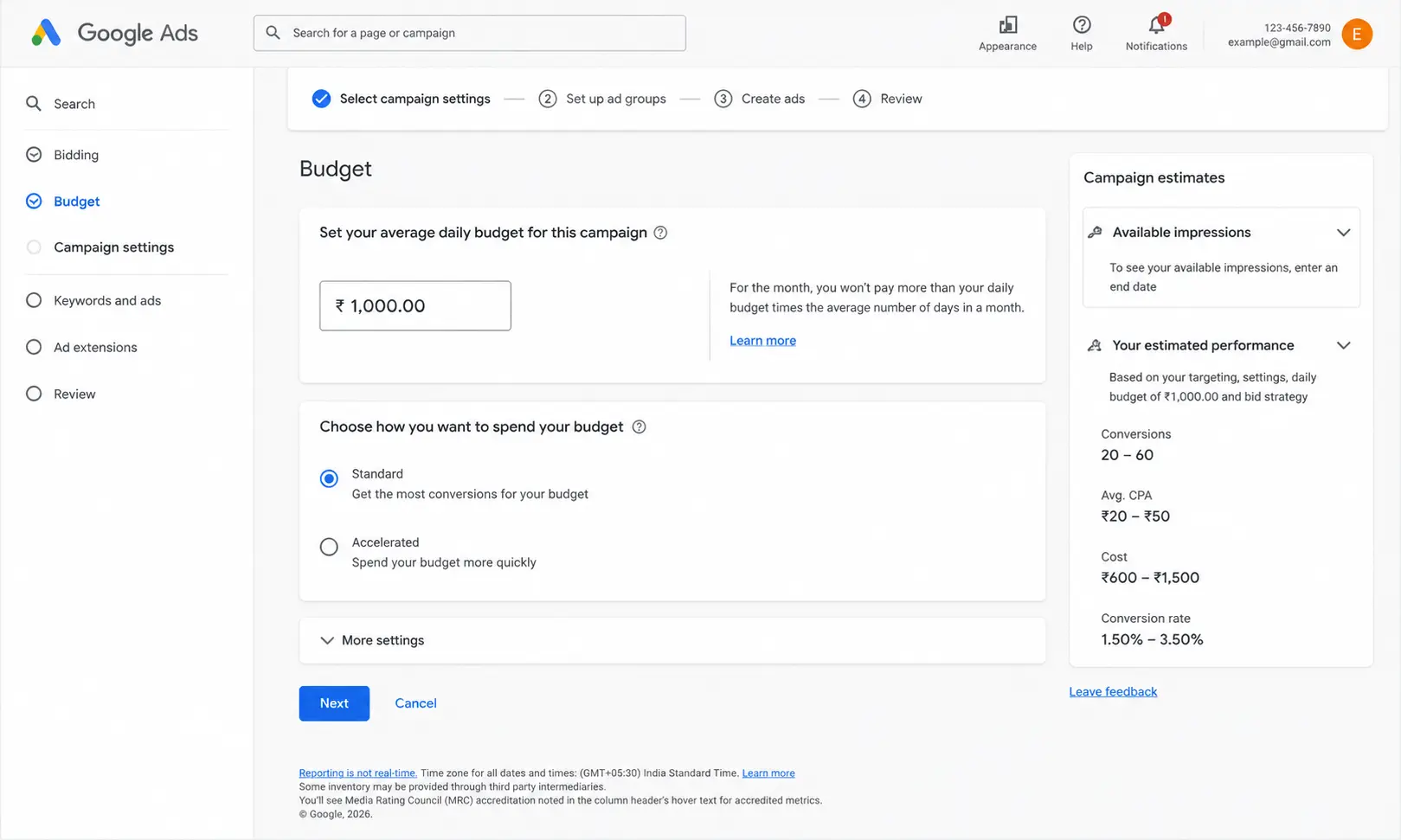
When you reach the budget screen, you’ll see a field that says:
“Set your average daily budget for this campaign”
That phrase average daily budget is doing a lot of heavy lifting. Let’s unpack it.
If you’re using advanced campaign types like Performance Max, budget behavior can differ slightly. Here’s a complete guide on how to set up Performance Max campaigns correctly.
What Is an Average Daily Budget?
The average daily budget is the amount you want to spend on average each day across your campaign. Google uses this number to manage your spending over a monthly billing cycle not just on a single day.
Think of it this way:
- Some days your target keywords get massive search volume → Google spends more
- Some days barely anyone searches → Google spends less
- Over the whole month, it averages out to your set budget
This gives Google the flexibility to capture the best traffic opportunities without you losing out on high-intent clicks just because you hit a daily ceiling.
Why does this matter for you?
Because if you see ₹700 or ₹800 deducted on a particular day when your budget is ₹500 it’s not a glitch. It’s Google doing exactly what it’s designed to do.
Want help optimizing your Google Ads budget before you waste spend?Book a free strategy call and get actionable insights for your campaigns.
Why Does Google Sometimes Spend More Than My Daily Budget?
This is the question I get asked the most. Let me explain it clearly.
The Logic Behind Overspending on Good Days
When Google’s algorithm detects that:
- Your keywords are getting high-quality, high-intent searches
- The traffic is likely to convert well for your business
- Competition is strong and bids are active
…it decides to capitalise on that opportunity by serving your ad more aggressively even if it means spending beyond your daily budget.
The idea is simple: if the traffic is good today, it’s better to spend ₹800 on great clicks than to cut off at ₹500 and miss valuable conversions.
This is especially common in AI-driven campaigns like Demand Gen. Learn how these campaigns work in this Google Demand Gen guide.
How Much Extra Can Google Spend?
Google can spend up to 2x (double) your daily budget on any given day.
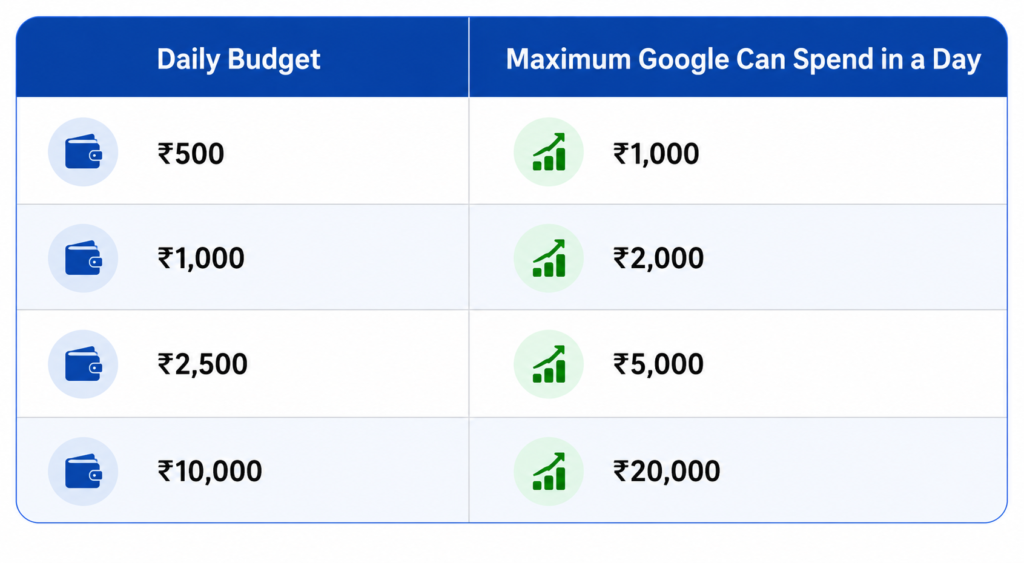
So if you set ₹500/day, on a really good day Google can spend up to ₹1,000. But it will balance that out over the month so your total doesn’t cross your monthly spend cap.
The Monthly Spend Cap Formula How Google Calculates It
Here is the formula Google uses to determine the maximum you’ll ever be charged in a month:
Monthly Spend Cap = Daily Budget × 30.4
Why 30.4?
Because 30.4 is the average number of days in a month when you divide a full year by 12 months:
365 days ÷ 12 months = 30.4166... ≈ 30.4
Google uses this fixed number across all months whether it’s a 28-day February or a 31-day July to keep billing consistent and predictable.
The Formula in Action
Monthly Spend Cap = ₹500 × 30.4 = ₹15,200
This means no matter what, if your daily budget is ₹500, Google will never charge you more than ₹15,200 in a calendar month.
Even if Google spends ₹1,000 on some days, it will spend proportionally less on other days to ensure the monthly total stays within ₹15,200.
Real-World Example: ₹500/Day Campaign {real-world-example}
Let me walk you through a real scenario so this clicks completely.
Campaign Setup:
- Daily Budget: ₹500
- Monthly Cap: ₹500 × 30.4 = ₹15,200
How a typical month might look:
| Week | Mon | Tue | Wed | Thu | Fri | Sat | Sun |
|---|---|---|---|---|---|---|---|
| Week 1 | ₹800 | ₹950 | ₹1,000 | ₹600 | ₹900 | ₹300 | ₹150 |
| Week 2 | ₹750 | ₹600 | ₹1,000 | ₹800 | ₹850 | ₹200 | ₹100 |
Notice how weekends (Saturday/Sunday) see much lower spend fewer people are searching for business-related services. Weekdays have higher traffic and higher spend. But by the end of the month, the total evens out close to ₹15,200.
What this means for you:
- Don’t panic when you see a higher-than-expected daily deduction
- Don’t assume Google is overcharging you
- Check your monthly total that’s the number that matters
- If the monthly total is under ₹15,200, Google has played by the rules
What Happens When You Start a Campaign Mid-Month? {campaign-started-mid-month}
This is where things can get a little confusing and where many beginners feel like they’re being overcharged.
If you start a campaign on, say, the 15th of the month, your billing cycle doesn’t start fresh from the 1st. Google calculates your remaining days in the month and adjusts accordingly.
Example:
- Campaign starts on 15th May (17 days remaining in the month)
- Daily Budget: ₹500
- Expected spend: ₹500 × 17 = ₹8,500
But because the 30.4-day average is the base of Google’s calculation and you’re now running for fewer days the daily variance can feel more pronounced. Some days may appear higher, some lower.
Pro tip: Give your campaign at least a full 30-day cycle before drawing conclusions about performance or overspending. Short observation windows can be misleading.
Tips to Stay in Control of Your Google Ads Spend {tips-to-control-spend}
Here are practical things you can do right now to manage your Google Ads budget more effectively in 2026:
1. Start with a Comfortable Daily Budget
Don’t stretch your budget thin. Start with an amount you’re comfortable spending even if conversions are low initially say ₹300–₹500/day for a local business.
2. Use Shared Budgets for Multiple Campaigns
If you’re running more than one campaign, use Google’s Shared Budget feature. It pools your budget across campaigns and allocates it dynamically based on performance.
3. Monitor Your Budget Pacing
In Google Ads, go to Campaigns → Budget and check the pacing indicator. It tells you if your budget is being used too fast or too slow.
In 2026, Google Ads daily and monthly budget pacing rules work like this — Google is allowed to spend up to 2x your daily budget on high-traffic days, but your total monthly charge will never exceed your Daily Budget × 30.4. This pacing system ensures your budget is distributed smartly across the entire month
4. Set Account-Level Spend Alerts
Under Tools & Settings → Billing → Set up billing notifications, you can set email alerts when your spend crosses a specific threshold. This is a must-do.
5. Check Impression Share Lost Due to Budget
If Google is telling you that your “Search Lost IS (budget)” is high, it means you’re leaving traffic on the table because your budget runs out too early in the day. Consider increasing your budget or using ad scheduling to focus spend during peak hours.
6. Use Campaign-Level Budgets, Not Ad Group-Level
Budget is set at the campaign level in Google Ads. You cannot set separate budgets for individual ad groups within a campaign. Plan accordingly.
7. Review Search Terms Report Weekly
Make sure you’re not burning budget on irrelevant search queries. Add negative keywords regularly to stop wasteful spend.
Common Mistakes Beginners Make with Google Ads Budget
I’ve worked with dozens of businesses setting up their first Google Ads campaigns, and these are the mistakes I see over and over again:
Mistake 1: Setting the Budget Too Low A ₹50/day budget in a competitive market like insurance, real estate, or legal services will barely get you any impressions. Research your industry’s average CPC before setting your budget.
For most businesses in India in 2026, the recommended minimum Google Ads budget starts at ₹200–₹500/day to see consistent impressions and gather enough data for optimisation.
Mistake 2: Pausing and Restarting Campaigns Frequently Every time you pause a campaign, Google’s machine learning has to relearn your audience. This slows down optimisation and wastes budget in the “learning phase.”
Mistake 3: Not Accounting for Weekend vs Weekday Traffic Most B2B businesses see significantly lower search volume on weekends. If your business is B2B, consider using ad scheduling to reduce or pause ads on weekends and reallocate that budget to weekdays.
Mistake 4: Judging Performance Too Early Google Ads typically needs 2–4 weeks of data to exit the learning phase, especially for Smart Bidding strategies. Don’t change budgets or bids in the first few days.
Mistake 5: Not Linking Google Analytics Without Google Analytics linked to your Google Ads account, you’re flying blind. You won’t know which keywords actually lead to conversions, contact form fills, or purchases.
Mistake 6: Ignoring Quality Score A poor Quality Score means you pay more per click than your competitors even if you have the same budget. Focus on improving ad relevance and landing page experience to lower your CPC and stretch your budget further.
You can also read this detailed Google Ads budget guide from WordStream to better understand ad spend planning for different business sizes.
How Google Ads Budget Works in 2026 – What’s Changed?
Google has been steadily pushing advertisers toward Performance Max campaigns and AI-driven Smart Bidding strategies. In 2026, here’s what’s relevant for budget management:
- Performance Max campaigns use a single budget across all Google surfaces (Search, Display, YouTube, Gmail, Maps). This makes budget management simpler but less granular.
- For Performance Max in 2026, Google recommends a minimum daily budget of at least 3x your Target CPA. So if your target cost per conversion is ₹300, your recommended minimum daily budget is ₹900/day — this gives the algorithm enough conversion data to optimise effectively.
- Smart Bidding with Target CPA or Target ROAS now has improved machine learning that works better even with smaller budgets — a ₹300–₹500/day campaign can now exit the learning phase faster than before.
- Google has improved budget recommendations inside the Ads interface these AI-driven suggestions are more accurate in 2026, but you should still evaluate them against your own data.
- Demand Gen campaigns (formerly Discovery) now allow more visual, scroll-friendly ad formats and they share budget logic with standard campaigns (average daily budget + 30.4 formula).Google Shopping Ads in 2026 follow the same average daily budget and 30.4 monthly cap formula. For eCommerce businesses running Shopping campaigns, your daily budget directly controls how many product impressions Google delivers — making budget planning especially important during peak sale seasons.
Frequently Asked Questions
Q: Will Google always spend my full daily budget?
No. On low-traffic days, Google might spend significantly less than your daily budget. That’s normal and expected.
Q: What if I want a hard daily cap?
Google Ads does not offer a strict daily hard cap by default. The closest option is to use manual bidding with lower bid amounts, combined with a lower daily budget but even then, some variance exists.
Q: Can I change my budget anytime?
Yes. You can change your daily budget at any point during a campaign. Changes take effect within a few hours.
Q: What is the minimum daily budget for Google Ads in India in 2026?
There’s no official minimum, but realistically you need at least ₹200–₹300/day to see any meaningful traffic for most local business categories.
Q: What is the minimum daily budget for Google Ads in Brazil in 2026?
Google Ads has no official minimum daily budget in Brazil in 2026, same as every other country. However, a realistic starting point is R$15–R$30/day depending on your niche and competition. Whether you are asking about 2025 or 2026, the same daily budget × 30.4 monthly cap formula applies globally — only the currency and competitive CPC rates differ by market.
Q: Does Google Ads have an official minimum budget or minimum spend in 2026?
No. Google Ads has no official minimum budget or minimum spend requirement in 2026. You can technically start a campaign with any amount. However, to get out of the learning phase and collect meaningful data, most experts recommend a minimum of ₹200–₹500/day for Indian markets and $5–$10/day for international campaigns.
Q: Does Google charge me if my ad doesn’t get clicks?
For Search campaigns, you only pay when someone clicks your ad (Cost-Per-Click model). Impressions alone don’t cost you anything in standard Search campaigns.
Q: My campaign spent ₹9,000 in 20 days on a ₹300/day budget. Is that wrong?
Let’s check: ₹300 × 30.4 = ₹9,120 monthly cap. If you started from day 1 of the billing month and 20 days have passed, ₹9,000 is actually within normal range. You’re not being overcharged.
My Final Take
Google Ads budget management isn’t complicated once you understand the core logic it’s an average daily budget that works within a monthly spend cap of Daily Budget × 30.4. Google will flex your daily spend up on high-traffic days and pull back on slow days to balance things out.
The most important things to remember:
- Your monthly cap = Daily Budget × 30.4
- Google can spend up to 2x your daily budget on any single day
- It will never exceed the monthly cap
- Give campaigns at least 30 days before evaluating performance
- Monitor monthly totals, not just daily deductions
If you’re just getting started with Google Ads, don’t let the budget mechanics intimidate you. Set a comfortable amount, monitor your spend weekly, and optimise as you learn.
Want to Learn More?
If you found this helpful, here are some related topics I’d recommend exploring next:
- Google Ads Bidding Strategies Explained (2026) — Manual vs Smart Bidding
- How to Choose the Right Keywords for Google Ads — Match Types Guide
- Google Ads Quality Score: What It Is and How to Improve It
- Performance Max vs Search Campaigns — Which Is Right for You?
- How to Set Up Google Ads Conversion Tracking in 2026
Conclusion
Understanding how Google Ads budget actually works is the foundation of running profitable campaigns. Whether you’re a small business owner spending ₹5,000 a month or a large enterprise managing lakhs in ad spend, the principles remain the same smart budgeting leads to smarter results.
To recap the key takeaways:
- Google Ads uses a daily budget system, but your actual spend can fluctuate sometimes up to 2x your daily limit on high-traffic days, balanced out over the month.
- Your monthly charge cap ensures you never pay more than your daily budget × 30.4 days.
- Choosing between Shared Budgets and Campaign-level budgets depends on your business goals and the number of campaigns you run.
- Always align your budget with your bidding strategy whether it’s Manual CPC, Target ROAS, or Maximize Conversions.
- Regularly monitor and optimize your budget allocation based on performance data don’t set it and forget it.
The most successful advertisers aren’t always the ones with the biggest budgets they’re the ones who understand where every rupee is going and why. Start with a clear goal, test consistently, analyze your data, and scale what works.
Now that you know how Google Ads budget truly works, you’re already ahead of most advertisers. Put this knowledge into action, and let your budget work smarter not harder.
Stop Guessing Your Google Ads Budget
If this article helped you understand how Google Ads budgeting really works in 2026, the next step is building a campaign that actually converts profitably.
I help businesses scale Google Ads with smarter bidding, better tracking, and conversion-focused strategy not wasted spend.
