

The Best Google Ads Account Structure for 2026 – A 3-Step Framework That Actually Works

The best Google Ads account structure for 2026 is no longer about creating endless campaigns and ad groups. Modern Google Ads success depends on clean account organization, strong conversion signals, and giving Google’s machine learning the right data to optimize performance.
Most advertisers still overcomplicate their Google Ads account structure, which leads to wasted budget, messy reporting, and weaker campaign performance. In this guide, I’ll show you the exact 3-step framework I use to build scalable Google Ads accounts in 2026.
I’ve reviewed hundreds of Google Ads accounts across e-commerce, lead generation, and local service businesses, and the same pattern appears repeatedly: when the structure improves, campaign performance improves.
This framework is designed to help you simplify campaign organization, improve optimisation signals, and build a Google Ads account structure that actually scales in 2026.
Why Account Structure Is the Most Important Optimisation You Can Make in 2026
Before we get into the steps, let’s talk about why structure matters so much especially now.
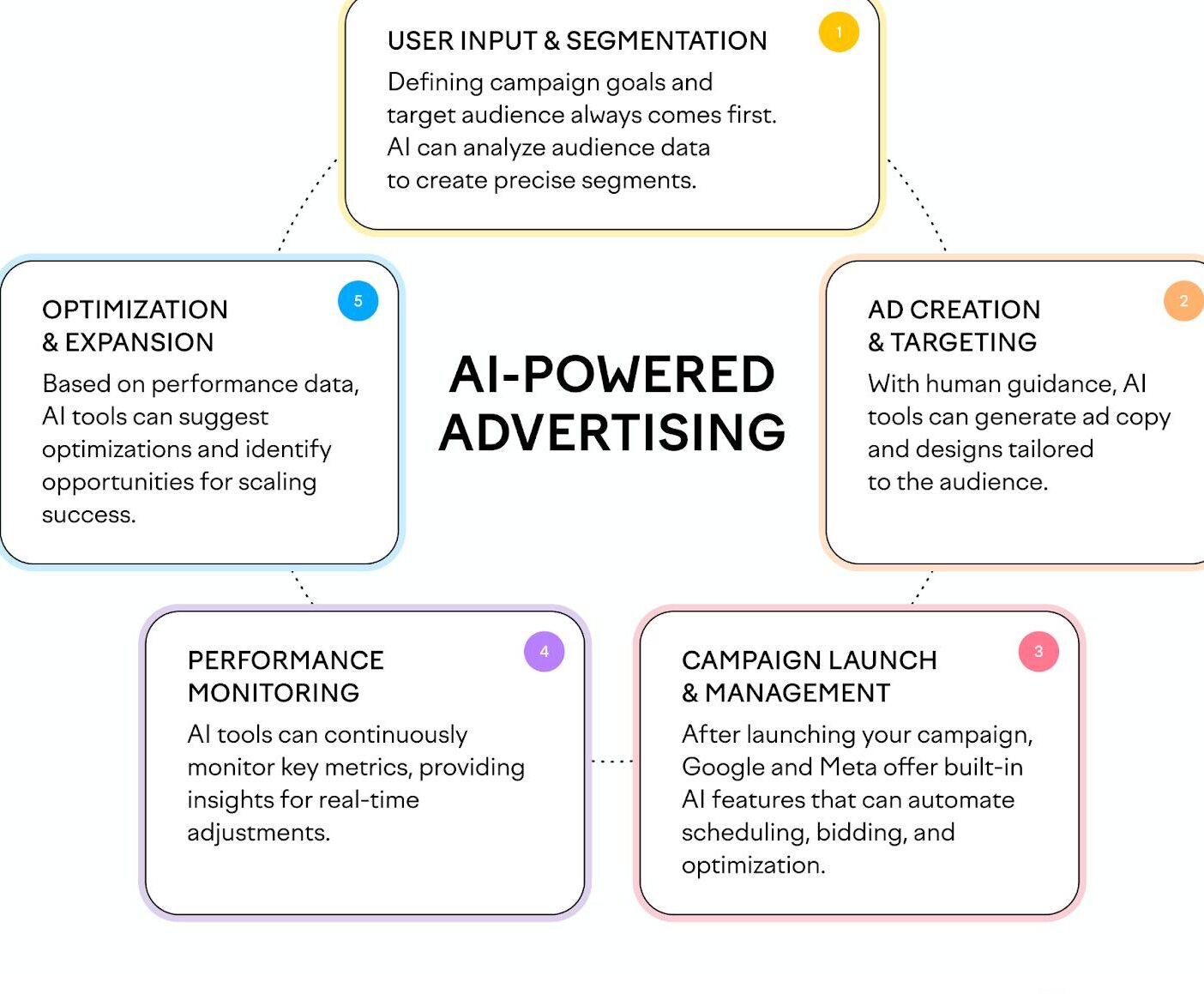
In 2026, Google’s AI is more aggressive than ever. AI Overviews are reshaping organic search, Demand Gen campaigns have expanded, and Performance Max has become even more dominant in how Google pushes advertisers toward automation. More automation sounds like it should make things easier. In reality, it makes structure more critical not less.
Google’s smart bidding, Performance Max, and automated targeting all operate at the campaign level. That means:
- Your budget is controlled at the campaign level
- Your bidding strategy learns and optimises within each campaign separately
- Google’s algorithm reads signals from how your campaigns are set up
When campaigns overlap in targeting, compete for the same audiences, or have conflicting goals, you’re feeding Google’s AI mixed signals. A confused algorithm does not spend your money efficiently.
A well-structured Google Ads account in 2026 improves performance and scalability. It gives Google a clear direction to optimize, which makes all the difference.
I’ve seen a structural overhaul drive ₹46 lakh in extra revenue from just ₹5 lakh in additional spend for an e-commerce brand. Another lead generation business doubled their daily new clients within 30 days, purely by fixing structure not by creating new ads or increasing budgets.
Structure first. Everything else second.
Step 1 – Identify Your “Levers” (Budget and Bidding Control)
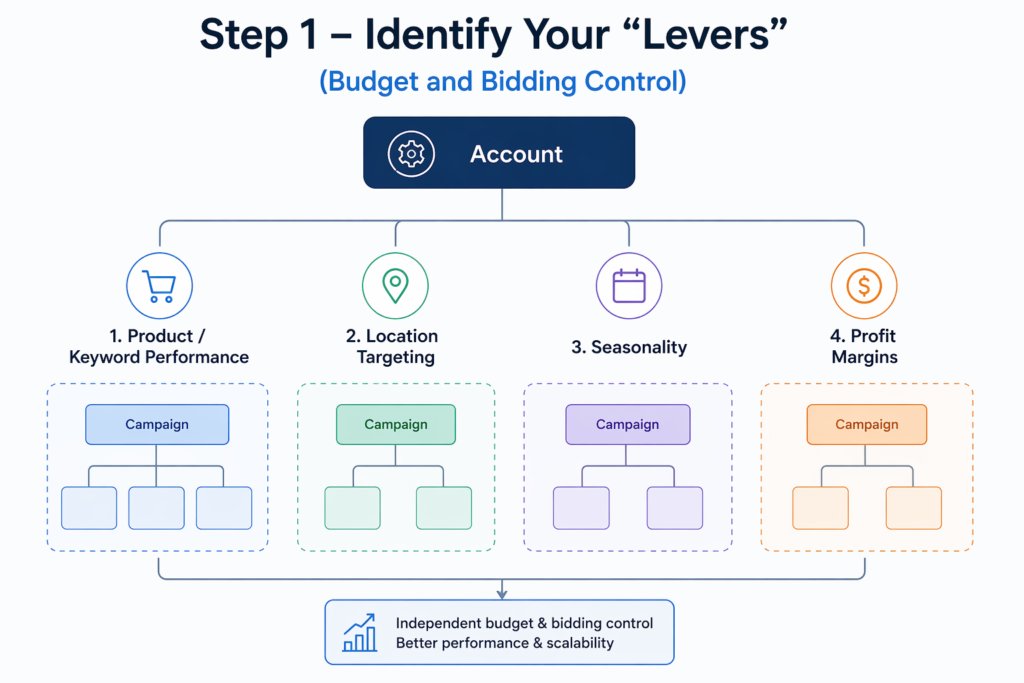
A lever is a campaign-level segment that gives you independent control over budget and bidding. Before you build a single campaign, you need to figure out: where do I actually need that control?
There are four main reasons to create separate levers in your account:
1. Product or keyword performance
Say you have three product categories. Two have similar margins and search volume they can likely share a campaign. But if the third has a lower search volume with a significantly higher profit margin, mixing it in is a mistake. The higher-volume categories will eat up budget, and Google will never give your high-margin products a real chance. Isolating them gives you a dedicated budget that matches their actual value to the business.
2. Location targeting
CPCs vary significantly by region. Search behaviour differs too even between cities in the same state. If you run multiple franchise locations or serve different service zones, you need spend control per area. A business covering Delhi and Mumbai should not have those two markets fighting for budget inside the same campaign.
3. Seasonality
Some products peak in summer, others in winter. If they share a campaign, you’re constantly fighting internal budget allocation. Separate seasonal campaigns let you ramp spend before peak season, pull back during off-season, and allow the algorithm to learn cleanly within each window.
4. Profit margins
A product with a 60% margin and one with a 15% margin cannot share the same Target ROAS strategy. Their economics are fundamentally different. Mixing them means your bidding is optimising for an average that doesn’t reflect either product accurately.
One more thing I watch for: sidekick products categories where you’re already getting traction, but Google keeps defaulting budget to your higher-volume keywords. Breaking these into their own campaign forces Google to invest in them, and often unlocks a growth opportunity you’d have left on the table.
Step 2 – Fix Your Offer Before You Fix Your Campaigns
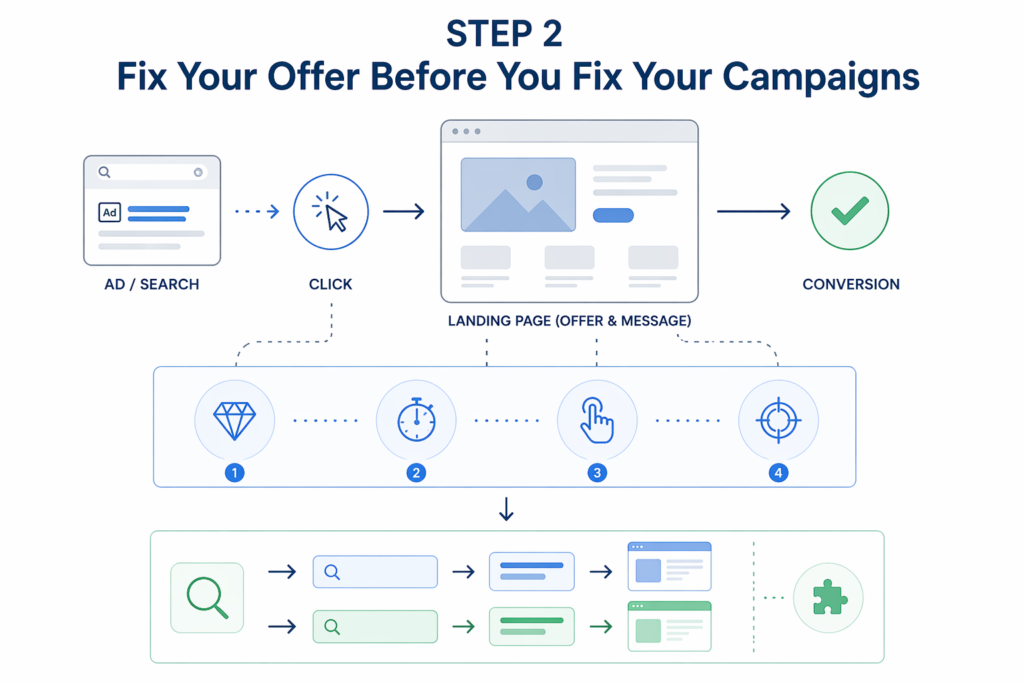
This is the step most people skip. It’s also the step that makes the biggest difference.
The best Google Ads account structure in the world cannot save a weak offer. Not better ad copy. Not a smarter bidding strategy. Not a tighter keyword list.
I hear this frequently: “Our search terms report looks perfect. Clicks are coming in. But we have almost zero conversions.” Nine times out of ten, when I dig in, the Google Ads side is doing its job. The problem is what happens after the click.
Before restructuring campaigns, ask yourself honestly:
- Is my offer clearly different from what my competitors are showing?
- Does my landing page communicate the core value within the first 5 seconds?
- Is there a clear, low-friction next step a form, a call button, a checkout?
- Does the landing page message match the intent of the search that triggered the ad?
Once you have a strong offer, the second part of this step is matching your messaging to each campaign or keyword theme. A person searching “emergency plumber near me” has a completely different intent than someone searching “bathroom renovation ideas.” They should land on different pages with different messages even if both are your customers.
Offer alignment is not a landing page task. It’s a structural one. Build it into how you think about each campaign from the start.
If your campaigns are getting clicks but not conversions, the problem might be your account structure not your ads.
I personally audit Google Ads accounts and identify:
- Budget leakage
- Campaign overlap
- Bad Performance Max structure
- Scaling bottlenecks
- Conversion tracking issues
👉 Book Your Free Google Ads Audit
Step 3 – Decide How Many Campaigns and What Types You Need
Now you know your levers and you have a strong offer. This is where you make actual campaign decisions.
Most guides hand you a template at this point. I’m not going to do that because what works for a single-location service business will not work for a multi-product e-commerce brand.
Here’s the thinking process instead:
- Each campaign should have one clear, documented purpose — if you can’t write that purpose in a single sentence, the campaign isn’t ready to be built
- Budget and bidding control is the primary reason to create a separate campaign — not keyword organisation
- Campaign types serve different roles — Search gives you keyword-level intent control; Performance Max gives Google broader reach across Shopping, Display, YouTube, and Gmail combined
- Start simpler than you think — you can always add campaigns as data grows; starting lean gives your smart bidding strategies cleaner data to learn from
A note on Performance Max: Many PMax campaigns default heavily toward the Shopping network. If you run a PMax campaign and you’re not seeing Search impressions, adding a dedicated Search campaign alongside it is often the right move not replacing PMax, but complementing it. A PMax CPC of ₹250 versus Search CPCs of ₹800–₹1,500 usually means they’re serving different channels, which is a healthy setup.
If you’re planning to scale with AI-driven campaigns, read my complete Google Performance Max setup guide to understand how automation performs best with a clean account structure.
| Step | Focus | Goal |
|---|---|---|
| Step 1 | Identify Levers | Control performance |
| Step 2 | Fix Offer | Improve conversion |
| Step 3 | Structure Campaigns | Scale efficiently |
The Golden Rule Every Google Ads Account Must Follow
Never have two campaigns targeting the same keywords, same products, same audiences, and same locations inside the same account.
One campaign. One purpose. Always.
When campaigns overlap in targeting, they compete against each other at auction which drives your own costs up. Any optimisation you make in one campaign gets partially cancelled out by the other. Google can’t cleanly attribute conversions. And your performance data becomes impossible to read.
Every time you’re about to add a new campaign, ask yourself: what is the specific reason this campaign needs to exist separately? If you can’t answer that clearly don’t create it.
Real Account Examples From the Field
Local service business – 2 search campaigns
A business offering two core services saw Service A pulling almost all the budget, while Service B despite strong intent signals was starved of spend and data in the same campaign. The fix was simple: two separate search campaigns, independent budgets. Clean, fast, effective.
Lead generation business – 5 campaigns
Three search campaigns, each built around one core service offering with tight exact match control. One branded campaign to protect brand search. One Performance Max campaign focused purely on new customer acquisition with offline conversions as the goal. Geographic breakouts planned once national-level data was established.
E-commerce brand – from 20 to 40+ daily sales
The problem: three Performance Max campaigns with no clear boundaries, all bleeding into each other and competing at auction. The fix involved pausing one PMax, drawing strict product category lines between the remaining two, removing branded keywords from PMax entirely, and adding dedicated Search campaigns for each category. The result: daily sales doubled from structural clarity alone, not from new creatives or bigger budgets.
Want Better Google Ads Performance in 2026?
A well-structured account can completely change profitability.
If you want help:
- Restructuring campaigns
- Scaling Performance Max
- Reducing wasted spend
- Improving ROAS
- Fixing lead quality
👉 Let’s work together.
Frequently Asked Questions
1. What is the best Google Ads account structure in 2026?
There’s no single best structure it depends on your products, locations, profit margins, and business goals. In 2026, with Performance Max dominating and Google pushing more automation, having the right structure matters more than ever. It gives you independent budget and bidding control across your most important segments. Use the 3-step framework: identify your levers, validate your offer, then build campaigns with one clear purpose each. This Google Ads account structure 2026 framework focuses on clarity and control.
2. How many campaigns should I have in Google Ads?
Only as many as you genuinely need. A local service business might only need 2 search campaigns. A multi-product e-commerce brand might need 6 or more. The number isn’t the point each campaign must have a clear, distinct purpose and must never overlap in targeting with another campaign in the same account.
3. Should I separate branded and non-branded campaigns?
Yes, in most cases. Branded keywords convert far more easily and cheaply than non-branded ones. Mixing them inflates your overall conversion rate and makes it impossible to properly evaluate non-branded performance. A dedicated branded campaign also protects your brand name if competitors are bidding on it.
4. When should I use Performance Max vs Search campaigns?
Search gives you precise control over keyword intent and messaging. Performance Max gives Google broader reach across Shopping, Display, YouTube, Gmail, and Search together. Use Search when you need tight control over intent. Use Performance Max for broader reach and new customer acquisition but always verify which channels it’s actually spending on.
5. Why are my Google Ads getting clicks but no conversions?
This is almost always a landing page or offer problem, not a Google Ads problem. Check that your landing page message matches the search intent of the keyword that triggered your ad, that your offer is genuinely competitive, and that the page loads quickly on mobile. The campaign may be working fine the drop-off is happening after the click.
Conclusion – What You Should Do Next
Google Ads is not a platform where you can layer optimisations on top of a broken foundation and expect things to improve. Structure comes first.
The good news is that a complicated account is not a better account. Some of the best-performing accounts I’ve worked with run on two or three campaigns well-structured, with clear purposes and clean budgets. Complexity for its own sake is not a strategy.
Here’s where to start:
- Audit what you have. Look at every running campaign and ask: does it have a unique purpose? Is it overlapping with another campaign in targeting?
- Map your levers. Write down the key segments of your business by product, location, margin, or seasonality where you genuinely need independent budget and bidding control.
- Check your offer first. If you’re getting clicks but no conversions, fix the landing page before restructuring anything.
- Rebuild with one purpose per campaign. Use the golden rule as your filter if a campaign doesn’t have a distinct reason to exist, don’t create it.
- Start simple, then scale. Fewer, cleaner campaigns give your smart bidding strategies better data to learn from.
Google’s AI rewards accounts that give it clear signals. A well-structured account is exactly that and the algorithm will do the rest.
